Less editing.
More intent.
Make parameters optional, extract functions, and copy code with its imports. Keep the focus on what your code should do.
Explore refactoringStay with the code, not the busywork. BetterPy adds thoughtful refactorings, pytest tools, and navigation to the editor you already know.
Install BetterPyFree · Available on JetBrains Marketplace
Interactive illustrations of BetterPy features. Use Play or step through each example.
Open the presentations in a full page ↗Built for the everyday
You know what you want to change. Your editor should help you get there.
Make parameters optional, extract functions, and copy code with its imports. Keep the focus on what your code should do.
Explore refactoringSpot fixture scope conflicts, missing assertions, and mismatched parametrization while you are still in the editor.
Explore pytest toolsFollow property usages, jump to class implementations, and filter the noise from your structure view.
Explore navigationLess friction, right where you work
No new workspace. No new routine.
Just a more capable PyCharm.
Make yourself at home
Open Settings → Plugins → Marketplace. Search for BetterPy and select Install.
Restart PyCharm when prompted, then open your existing Python project.
Explore Settings → Tools → BetterPy. Turn individual features on or off to suit your work.
Small details. Real features.
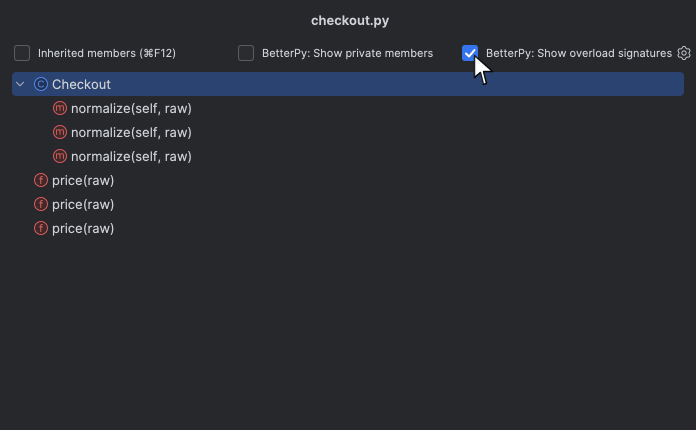
Hide overload signatures in the structure view and see the implementation that matters. It is one of 97 features documented in this channel.
See the structure view tools ↗Actual BetterPy recording. Play to see it in action.
A few things to know
Designed to fit the way you already work.
BetterPy adds Python intentions, inspections, refactorings, navigation, and pytest tools. They appear in familiar IDE surfaces such as context actions, the editor, and the structure view.
Yes. BetterPy is free.
BetterPy maintains releases for PyCharm 2026.1, 2026.2, and 2026.3. Check the Marketplace listing for the exact build compatible with your IDE.
Yes. Open Settings → Tools → BetterPy and enable only the features you want. You can also disable or uninstall the plugin through PyCharm’s Plugins settings.
Place the caret on the code you want to change and open PyCharm’s context actions menu. Available actions depend on the code and your enabled features.
BetterPy’s anonymous usage analytics do not collect source code, file paths, or project names. Analytics follow the IDE usage statistics preference initially and can be changed in BetterPy’s Analytics & Privacy settings. Read the privacy information.
Use Create GitHub Issue from the BetterPy status bar menu to include diagnostics, or visit the issue tracker. Review diagnostic data before sharing it.

Your next good addition
Keep your editor. Lose a little busywork.
Install BetterPyFree. Features you can switch off anytime.